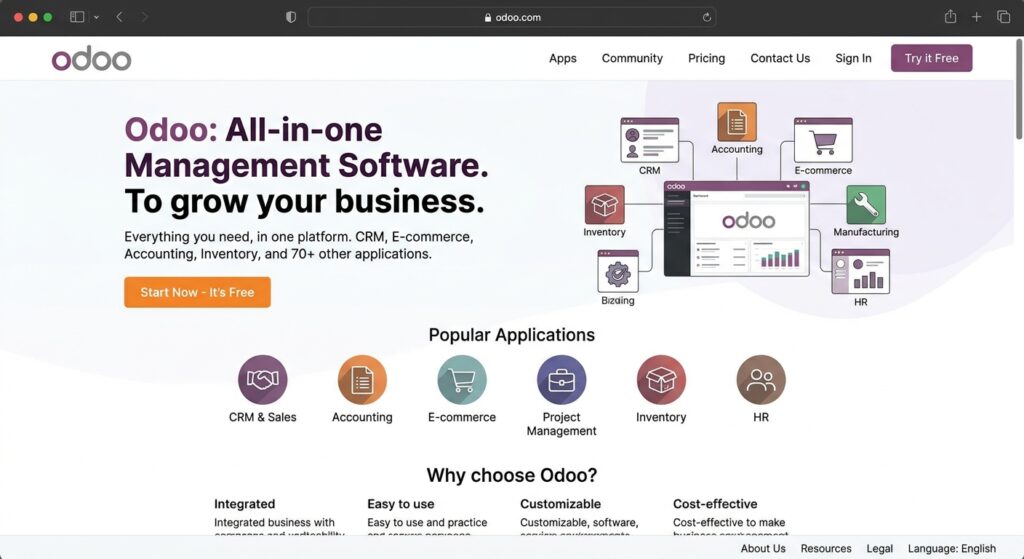

Choosing the right website platform is an important decision for any business. A good website should look professional, provide a smooth user experience, support search engine optimization (SEO), and help a company manage its daily operations. Odoo Website is one option that brings website creation together with business applications such as sales, customer relationship management (CRM), inventory, and eCommerce.
But is Odoo Website the right choice for every business? Does it provide enough design flexibility, useful SEO tools, and reliable eCommerce functionality to justify using it?
In this Odoo Website review, we explore its main features, advantages, disadvantages, pricing considerations, SEO capabilities, and alternatives. The goal is to help business owners understand what the platform offers and decide whether it matches their requirements.
What Is Odoo Website?
Odoo Website is a website-building application within the Odoo business management platform. It allows users to create, customize, and manage websites through a visual editor without requiring advanced programming knowledge.
Unlike a website builder that focuses mainly on design, Odoo connects website management with other business applications. For example, a company can use its website alongside Odoo CRM, Sales, Inventory, Accounting, and eCommerce applications.
This integration can be useful for businesses that want to manage several activities through one system rather than relying on many separate tools.
Understanding the Purpose of Odoo Website
The main purpose of Odoo Website is to help businesses establish and manage their online presence while connecting website activities with business operations.
Users can create pages, publish content, add images, manage menus, and build online stores. Businesses can also connect website forms with customer management workflows.
Who Can Use Odoo Website?
Odoo Website may be suitable for:
- Small and medium-sized businesses creating a professional website.
- Retailers planning to sell products online.
- Service providers collecting customer inquiries.
- Companies already using Odoo business applications.
- Organizations that want website and business management tools in one platform.
However, businesses that need highly specialized web development or extensive design freedom should evaluate its customization options before choosing it.
How Does Odoo Website Work?
Odoo Website works through a visual website editor and a collection of connected applications. Users can create website pages, arrange content, configure settings, and publish changes through the platform.
The exact experience depends on the Odoo version, hosting arrangement, installed applications, and user permissions.
Getting Started With Website Creation
A typical website creation process includes:
- Creating or accessing an Odoo database.
- Installing or opening the Website application.
- Selecting a suitable theme or starting layout.
- Adding pages, text, images, and other content.
- Customizing navigation menus and website settings.
- Reviewing the website on different screen sizes.
- Connecting a domain and publishing the website.
The visual editor makes many common editing tasks accessible to non-developers.
Understanding the Website Editor
Odoo uses building blocks to help users arrange website content. These blocks can include text sections, images, banners, buttons, forms, and other page elements.
Users can move, edit, duplicate, or remove supported blocks to create page layouts that match their business needs.
This approach reduces the need to write code for ordinary content changes. More advanced customization may still require technical knowledge.
Key Features of Odoo Website
Odoo Website offers several features for creating and managing business websites. Its strongest advantage is the connection between website functions and the wider Odoo application ecosystem.
Drag-and-Drop Website Builder
The visual editor allows users to build pages by arranging available content blocks. This can make routine website updates easier for business owners and marketing teams.
Users can modify page layouts, add multimedia content, and adjust supported design settings without manually writing every element in HTML or CSS.
Website Themes and Customization
Odoo provides website themes and design controls that help users create a consistent appearance. Depending on the available theme and version, users can adjust elements such as:
- Colors and typography.
- Headers and footers.
- Navigation menus.
- Page layouts.
- Images and background sections.
- Buttons and content blocks.
Businesses should preview their pages carefully because the available design options may differ between themes.
Built-In eCommerce Functionality
Odoo eCommerce allows businesses to create product catalogs and manage online sales through the same platform. Odoo Website eCommerce features include product management, product variants, customer accounts, checkout configuration, delivery methods, and order handling.
Businesses can also connect online orders with related processes such as inventory management, sales, and invoicing. This integration can reduce manual work when the company already uses Odoo for its business operations.
Contact Forms and Customer Management
Contact forms help website visitors send inquiries, request information, or communicate with a business. When configured with relevant Odoo applications, website submissions can support customer management and sales workflows.
This can be particularly helpful for service-based businesses that depend on customer inquiries and follow-up communication.
Multilingual Website Support
Businesses serving customers in different countries may need content in multiple languages.
Odoo provides website translation features that allow users to manage translated website content. This can help organizations create a more accessible experience for international visitors.
Odoo Website SEO Features
Search engine optimization is an important consideration when selecting a website platform. Odoo includes several tools that help website owners manage basic and technical SEO settings.
However, having built-in SEO tools does not automatically make a website rank higher in search results. Rankings also depend on content quality, competition, technical performance, website reputation, and other factors.
Meta Titles and Meta Descriptions
Odoo provides settings for managing SEO information on website pages. A well-written meta title should explain the page topic clearly, while a useful meta description should summarize what visitors can expect.
Businesses should create unique metadata for important pages rather than repeating the same description across the entire website.
Search Engine Indexing and Sitemaps
Odoo’s website documentation includes tools and settings related to indexing, sitemaps, and robots.txt. These settings help website owners manage how search engines discover and access website pages.
Before publishing a website, owners should check that important pages are allowed to be indexed and that pages they do not want indexed are configured appropriately.
Submitting a sitemap through Google Search Console can also help search engines discover relevant URLs.
Image Optimization and Content Structure
Images can improve the appearance of a website, but poorly optimized images may affect loading performance. Website owners should use relevant image filenames, descriptive alternative text, and appropriately sized image files.
They should also organize content using clear headings, descriptive page URLs, useful internal links, and informative page text. These practices help visitors understand the content and make Odoo Website easier for search engines to interpret page topics.
Google Analytics and Search Console
Odoo supports integrations and configuration options for website analytics and Google Search Console. These tools can help website owners understand visitor behavior, monitor search performance, and identify potential website issues.
Odoo Website User Experience and Performance
A successful business website should be easy to navigate, accessible, and responsive across different devices.
Odoo provides design tools for creating page layouts and managing navigation. Nevertheless, the quality of the final experience depends on how the website is configured and maintained.
Mobile-Friendly Website Design
Many visitors browse websites through smartphones and tablets. Therefore, businesses should check how their pages appear on smaller screens. Important elements to review include:
- Text readability.
- Menu accessibility.
- Image sizing.
- Button placement.
- Form usability.
- Page layout and spacing.
Do not assume that every custom layout will work perfectly on every device. Preview and test important pages before publishing.
Website Loading Speed
Website performance can influence visitor satisfaction and search performance. Actual loading speed depends on several factors, including hosting, page design, image sizes, scripts, third-party integrations, and traffic levels.
Odoo’s platform features alone cannot guarantee that every website will load quickly. Businesses should test important pages using tools such as Google PageSpeed Insights and review real performance data where available.
Navigation and Accessibility
Clear navigation helps visitors find information without unnecessary effort. A business website should have understandable menu labels, logical page organization, readable text, and accessible interactive elements.
Owners should also check color contrast, image descriptions, form labels, and keyboard navigation where applicable.
Odoo Website Pricing: What Should You Know?
Odoo offers different subscription options, including a One App Free option and paid plans. The available applications and hosting choices depend on the selected plan.
The Standard and Custom plans provide access to Odoo applications under their respective subscription conditions. The Custom plan also supports additional customization and hosting options.
One App Free Plan
Odoo offers a free option for using one application with unlimited users, subject to the plan’s conditions.
This may be useful for exploring Odoo or starting with a limited requirement. Businesses should confirm whether their intended website setup and additional applications fit within the free option.
Standard Plan
The Standard plan provides access to Odoo applications through Odoo Online hosting. Odoo Website may suit businesses that want to use standard Odoo functionality without managing their own server infrastructure.
Custom Plan
The Custom plan provides additional flexibility, including options for Odoo Online, Odoo.sh, or on-premise hosting, subject to Odoo’s terms. Odoo Website may be more appropriate for businesses that need advanced customization, external API access, or a different hosting arrangement.
Additional Costs to Consider
Before selecting a plan, businesses should consider:
- Subscription fees and the number of paid users.
- Odoo.sh hosting charges, where applicable.
- Domain registration and renewal.
- Website design or development services.
- Custom modules and integrations.
- Implementation, training, and maintenance.
Pricing can vary by country, billing period, promotions, and subscription conditions. Check the current pricing shown for your location before making a financial decision.
Advantages of Using Odoo Website
Odoo Website offers several benefits for businesses that want website management connected to their operations.
Connected Business Applications
One of its main advantages is its integration with other Odoo applications.
Beginner-Friendly Website Editing
The visual editor and building blocks make many routine website editing tasks easier. Users can update text, images, and page layouts without needing to develop every change from scratch.
Integrated eCommerce Management
Businesses can manage products, orders, and related operations through connected Odoo applications. This can be especially useful for companies that want their online store and internal business processes to work together.
SEO Configuration Tools
Odoo includes options for managing page metadata, indexing settings, sitemaps, and other SEO-related features. These tools provide a foundation for website optimization, although successful SEO still requires useful content and ongoing technical work.
Disadvantages and Limitations of Odoo Website
Although Odoo Website has useful features, it may not be the best solution for every website project.
Customization Can Require Technical Knowledge
The visual editor supports common design changes, but advanced functionality may require development skills. Businesses with very specific design or technical requirements should evaluate the platform before committing to it.
Hosting Options Have Different Limitations
Odoo Online, Odoo.sh, and on-premise hosting are not identical in terms of customization and maintenance responsibilities. Businesses should select their hosting option according to their technical requirements.
Learning the Wider Odoo Platform
Odoo includes many connected business applications. While this integration can be helpful, learning the broader system may take time. Companies using several applications may need onboarding, configuration, and staff training.
Total Cost May Increase
The subscription is only one part of the overall project cost. Custom development, hosting choices, implementation, training, and ongoing support may increase the total investment. Businesses should calculate the expected cost before choosing a plan.
Odoo Website vs WordPress, Wix, and Shopify
Odoo Website competes with several popular website platforms, but each serves somewhat different needs.
Odoo Website vs WordPress
WordPress is widely used for blogs, business websites, and content-focused projects. Its themes and plugin ecosystem provide many customization possibilities. Odoo is more focused on connecting website activities with business applications.
WordPress may be a better fit for businesses that prioritize content publishing and a large selection of website extensions. Odoo may be more suitable when website management needs to connect closely with CRM, sales, inventory, and other business processes.
Odoo Website vs Wix
Wix focuses on visual website creation and offers a range of design tools for users who want to build websites without managing a complex business platform. Odoo provides website creation alongside a broader collection of business applications.
Wix may suit users who mainly need an easy-to-manage website. Odoo may be more attractive to businesses that want an integrated operational system.
Odoo Website vs Shopify
Shopify is primarily designed for eCommerce businesses. Odoo Website provides tools for managing online stores, products, orders, and sales channels. Odoo eCommerce connects online selling with broader business applications, including inventory and accounting workflows.
Shopify may be preferable for businesses that want a dedicated commerce platform. Odoo may suit businesses that want their online store integrated with other operational processes.
Is Odoo Website Safe and Reliable?
Odoo Website provides hosting and security-related services for its managed hosting options. Its pricing information describes hosting, maintenance, monitoring, and backup provisions for included plans.
However, website security also depends on how the system is configured and used. Businesses should use strong passwords, restrict access according to employee responsibilities, keep software updated, and review integrations before installing them.
Organizations using on-premise hosting must pay particular attention to server maintenance, security updates, and backup management. No platform should be considered completely risk-free. Businesses should review the relevant service terms, security documentation, and backup arrangements before storing important information.
Read more: Webparsab com: How It Works, Features & More
Who Should Use Odoo Website?
Odoo Website is worth considering when a business needs more than a basic website.
It may be a good option for:
- Businesses already using Odoo applications.
- Small and medium-sized companies managing sales and customer information.
- Retailers that want connected eCommerce and inventory workflows.
- Service providers collecting website inquiries.
- Organizations looking for website and business management in one platform.
It may be less suitable for users who want a simple personal blog, highly specialized publishing tools, or complete control over every aspect of website design without technical development.
Final Thoughts
Odoo Website is a practical option for businesses that want to create a website while connecting it with sales, customer management, inventory, and eCommerce operations. Its visual editor makes everyday page editing accessible, while its wider application ecosystem provides additional business functionality.
However, Odoo Website is not the perfect solution for every project. Advanced customization may require technical knowledge, hosting options have different limitations, and the overall cost should be evaluated carefully.
Before choosing Odoo, identify your website goals, required applications, customization needs, hosting preferences, and available budget. Compare those requirements with the features included in the relevant Odoo plan.
FAQs About Odoo Website
1. What Is Odoo Website Used For?
It is used to create, customize, and manage business websites. It also connects website activities with other Odoo applications, including CRM, Sales, and eCommerce.
2. Is Odoo Website Free to Use?
Odoo offers a One App Free option, but its availability and limitations depend on the subscription conditions. Businesses needing additional applications or advanced functionality may require a paid plan.
3. Is Odoo Website Good for SEO?
Odoo provides SEO-related tools such as metadata settings, sitemap management, indexing controls, and analytics integrations.
4. Can I Build an Online Store With Odoo Website?
Yes. Odoo eCommerce supports product catalogs, product variants, customer accounts, checkout configuration, delivery methods, and order management.
5. Is Odoo Website Better Than WordPress?
Neither platform is automatically better for every business. WordPress may be more suitable for content-focused websites and extensive plugin-based customization.